Posts

Showing posts with the label Raspberry Pi

Arduino DHT22 readings over serial
Image
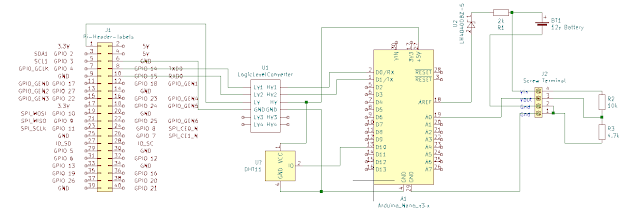
 Today I am going to add a DHT22 temperature humidity sensor to my existing battery voltage monitor project. Uploading and testing the code is done over USB cable, the HC-05 needs to be disconnected for this to work. The DHT22 is connected to +5v, gnd and Digital Pin 10, I only chose pin10 as it is convenient for my veroboard layout. The code for this is very simple : <code> #include "DHT.h" #define DHTPIN 2 // The pin that your DHT is connected to DHT dht(DHTPIN, DHT22); void setup() { dht.begin(); } void loop(){ float h = dht.readHumidity();     //stores humidity value in float variable h float t = dht.readTemperature();// temperature value } </code> Don't forget to import the "DHT sensor library" in library manager in the Arduino IDE.  We can then do whatever we need to with the values. I am going to send request them over serial via a HC-05 Bluetooth device from a Python script on a Raspberry Pi.  For testing  am using a laptop running ...

Laptop to Arduino Nano with HC-05 Bluetooth Module

Image
 After getting a serial connection to work between an Arduino Nano and Pi Zero in a previous project I purchased a HC-05 Bluetooth module so that the Pi can be removed from the enclosure, this should reduce the power requirement significantly resulting in increased battery life. Power requirements : Pi Zero, Arduino Nano 290mA Arduino Nano, HC-05 module Bluetooth Module 50mA The power reduction is huge but it is a bid of a mess when soldered onto veroboard. (I have ordered a few ESP32 for a future improved version.) The wiring diagram is very similar, just replace the Pi Zero with the HC-05 as below. You can ignore everything to the right of the Nano, it is not required for Bluetooth but i am using it to retrieve a battery level reading. When powered up the led on the HC-05 should flash rapidly indicating ready to connect. To test you can use the Android app "Serial Bluetooth Terminal". The default pairing code is "1234". I will be using Python to communicate with t...

PiZero Install OS and configure.

Image
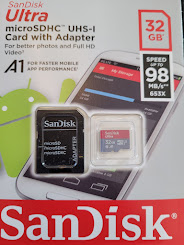
Installing Raspbian Raspberry Pi OS and configure basic settings. I have a few Raspberry Pi around the house. One Pi3 runs PiHole and MySql, a Pi4 controls a 3d printer and a PiZeroW monitors the water feature and turns on the heater if it gets a bit cold..... Before you start doing any of this you will need to install the OS and get your Pi connected to your network. In this example I will use a PiZeroW, note the W ! it means that it has WiFi, this version only costs around £14 with a pre-soldered header (my soldering is rubbish :) from Pimoroni UK or Pi Hut etc. Parts Required: Raspberry Pi with WiFi Micro SD Card 8GB min, 16GB + recommended. Micro SD Card adapter to connect to your PC. Notes on the microSD card. Please do not buy the cheapest you can find, you may experience hard to trace errors, poor performance or data loss with a sub standard part. From experience I recommend the SanDiskULTRA, Class 10, A1, 32GB. It can be found online for around £5 and is at the time or writing...