Pi GPIO Connect an LED
Connecting an LED to a GPIO and turning it on is probably one of the most simple things that we can use the Pi GPIO for. There is however a bit of thought that needs to go in to it so that we do not damage anything.

We will need the following :
- Pi with a GPIO
- LED
- 220ohm Resistor(red, red, black, black or any larger up to ~1k)
- Jumper wires
Strictly speaking we should calculate the correct value for the resistor but 220ohm or above will be fine for both 3.3v RPi GPIO output and 5v if required.
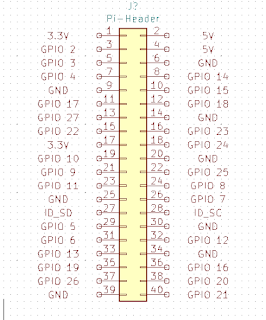
I have chosen GPIO21 (Pin40) as the output and the resistor is in series with the LED. The short leg of the LED goes towards ground.

Create a new python script "nano led.py"
import RPi.GPIO as GPIO
import time
GPIO.setmode(GPIO.BCM) #Board is Physical pin 1-40, BCM is GPIO NN
GPIO.setup(21, GPIO.OUT) #Sets GPIO 21 to output mode
GPIO.output(21, GPIO.HIGH) #Sets GPIO 21 High +3.3v
time.sleep(5) #Sleep / Wait for 5 seconds
GPIO.output(21, GPIO.LOW) #Sets GPIO 21 Low 0v
GPIO.cleanup() #Releases GPIO good practice.
import time
GPIO.setmode(GPIO.BCM) #Board is Physical pin 1-40, BCM is GPIO NN
GPIO.setup(21, GPIO.OUT) #Sets GPIO 21 to output mode
GPIO.output(21, GPIO.HIGH) #Sets GPIO 21 High +3.3v
time.sleep(5) #Sleep / Wait for 5 seconds
GPIO.output(21, GPIO.LOW) #Sets GPIO 21 Low 0v
GPIO.cleanup() #Releases GPIO good practice.
Run it using "python led.py"
Your LED should go on for 5 seconds and then turn off.

Adding additional LED's is just a case of using an additional GPIO.


Comments
Post a Comment